
Free Wi-Fi is everywhere now: in cafes, malls, hotels, hospitals and airports across Oman and the Gulf. It is convenient, but on an open network other people can see more of your traffic than you think. Here is what can go wrong and how to protect yourself in a few minutes.
What can go wrong on public Wi-Fi?
- Fake hotspots: an attacker creates a network with a name like "Free Airport WiFi" or a copy of a cafe's name, and everything you send goes through their device.
- Snooping: on an open network without a password, others on the same Wi-Fi can try to watch unencrypted traffic.
- Fake login pages: a hotspot shows a page that looks like Google, Facebook or your bank and asks for your password.
- Weak routers: old, badly set up routers can be taken over and used to redirect you to harmful sites.
8 habits that keep you safe
- 1. Ask staff for the exact network name before you connect.
- 2. Prefer networks with a password, and never assume an open network is safe.
- 3. Turn on a VPN before you open any app, especially banking, email and shopping.
- 4. Check for the padlock and the right address in your browser before typing a password.
- 5. Turn on two-factor authentication for WhatsApp, email, Google and banking.
- 6. Turn off automatic connection to open networks and "forget" networks you no longer use.
- 7. Keep your phone, laptop and apps updated.
- 8. For banking or payments, use your mobile data if you can.
How a VPN protects you
A VPN creates an encrypted tunnel between your device and the VPN server. Even on an open Wi-Fi network, the people around you, and even a fake hotspot, only see scrambled data instead of the sites you visit and the passwords you type. Your real IP address is hidden as well.
Make it automatic with Auto Connect
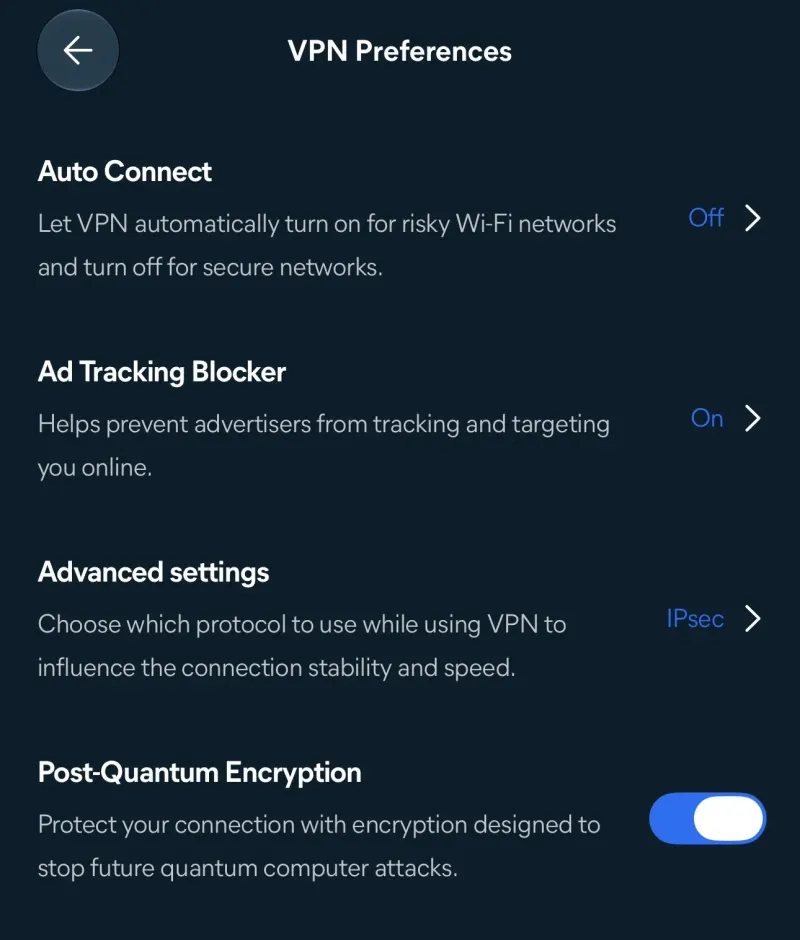
The easiest protection is the one you do not have to remember. In Avast Premium VPN, open VPN Preferences and turn on Auto Connect: the VPN then switches on by itself on risky Wi-Fi networks and turns off on secure ones like your home network. Add the Ad Tracking Blocker and Post-Quantum Encryption for extra privacy.
Check the network itself
Free tools like the Wi-Fi Inspector in Avast Free Antivirus scan the network you are on and warn you about weak passwords, open ports and devices that should not be there. It is a good check for your home router too.
A note on using VPNs in Oman
Use a VPN for privacy and security, and always within the law. Rules for VPN use differ from country to country, so follow the laws of Oman or of the country you are visiting, as well as the terms of the services you use.
Need a fast, secure website for your business?
Security matters for websites too. arafatbin.com builds fast, secure websites with free SSL, spam-protected forms and regular backups for businesses in Oman and the GCC, from OMR 20.
Avast, SecureLine and the product names in this article are trademarks of their owners. arafatbin.com is independent and not connected to Avast.